
Organize your work: Projects, folders, and versions
Dubly.AI lets you group your dubs into Projects — think of them as folders.
Projects — folders for your dubs
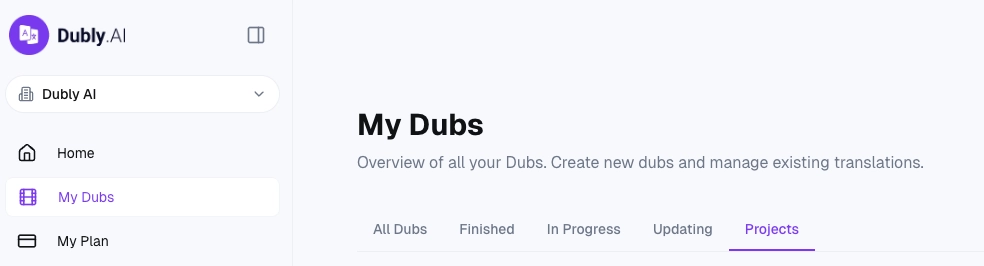
Where to find them: Open My Dubs from the sidebar and switch to the Projects tab. You'll see a grid of cards, one per project, with a name, tag, and a count of dubs inside.
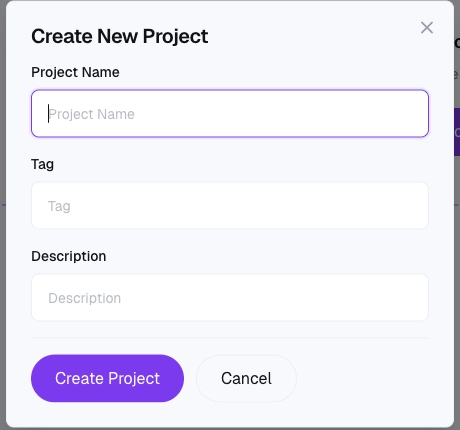
Creating a project:
Click New Project.
Fill in:
Name (required).
Description (optional, up to 500 characters — useful for briefing teammates).
Tag (optional, a short label).
Save.
Adding dubs to a project: When you create a new dub, you can assign it to a project in the dub creation modal. Once a dub is created, its project assignment cannot be changed from the UI — plan ahead, or delete and re-create if you need to reassign. Viewing dubs in a project: Click the project card to open the project detail page. Every dub assigned to that project is listed there, with the usual status, language, and action buttons. Renaming or deleting a project: On the project card, open the three-dot menu:
Edit — change the name, description, color, or tag.
Delete — removes the project. Dubs inside are not deleted — they just become unassigned and appear in your main dubs list again. Who can manage projects: Any member of your organization can create, edit, and delete projects. There's no Owner/Admin restriction. Good uses for projects:
One project per client (for agencies).
One project per campaign or season (for content teams).
One project per product (for internal localization teams).
Not yet available
These features are commonly requested but are not currently available in the platform but they are already under active development and will be available soon:
Moving a dub between projects after creation.
Nested projects or sub-folders.
Sharing a project externally with a link.
Per-project permissions (who can see or edit what).
Auto-archive of old projects. If any of these would materially change how you'd use Dubly.AI, tell us — it's exactly the kind of feedback that shapes our roadmap.
Still have questions?
For anything project-related that isn't covered above, contact support@dubly.ai.