
Choose your source and target languages
Picking the right source and target languages is the foundation of a good dub. This article covers where to set them and how to pick well. For the full list of what's supported, see Supported Languages & Dialects (Full List).
Where you set them
In the dub creation modal, before you start processing:
Source language — the language spoken in your video. Pick it from the dropdown.
Target languages — the languages you want the dub translated into. Pick one or more from the dropdown.
Both fields are set before processing starts. After the dub is created, the source and target languages cannot be changed — delete the dub and start over if you picked wrong.
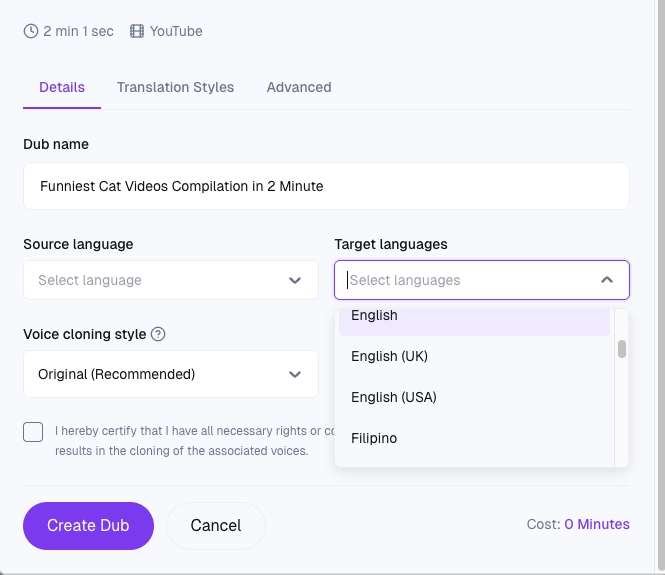
Picking the source language
Set this manually — Dubly.AI does not auto-detect the source language. Best practice:
Pick the specific language the speaker actually uses, not your brand's default.
If your video has a short intro in one language and then switches (e.g., a German "Hallo!" before the speaker continues in English), pick the dominant language — the other bits can be fixed afterwards in the transcript editor.
If your source video features multiple languages, you will achieve the best results by selecting the dominant one. Fully bilingual content is not supported within a single dub. In such cases, it is highly recommended to translate the segments as two separate videos to ensure the highest quality for each language. Picking the wrong source language is the single biggest cause of bad dubs.
Picking target languages
How to decide:
Start with your priority markets. If you serve a few, dub only those first and see the quality before expanding.
Check for a dialect. For English and Spanish, picking the right regional variant (US vs. UK, Latin America vs. Spain) changes both vocabulary and voice. Use the variant your audience expects.
Budget per language. Each additional target language adds 1 credit per minute of source video — a 10-minute video into 5 languages = 50 credits. See What does it cost to translate my videos?.
Dialects you can choose explicitly
Today you can pick a regional variant directly in the UI for:
English — UK or US
Spanish — Latin America or Spain For all other target languages, Dubly.AI uses one neutral default. If you need a specific regional variant for a market that isn't already in the dropdown, contact hello@dubly.ai and we'll tell you whether it can be arranged.
Planning your set of languages
When you're dubbing regular content (weekly show, product updates, evergreen tutorials), set up a Translation Style for each target language pair you use often. It takes a few minutes to set up but pays back on every dub — your brand names, product terms, and tone stay consistent without per-dub fixes.